

SMR, HAMR and firmware: the new limits of the head swap in data recovery. A research paper from the laboratory, dated June 2026 and revised in September 2026.
1. Introduction
Magnetic recording technologies have evolved from the first longitudinal recording drives (LMR) to today's high-density energy-assisted solutions (EAMR), by way of conventional perpendicular recording (PMR/CMR) and shingled recording (SMR). Each generation introduces new sources of complexity for data recovery. The head swap, a fundamental laboratory technique, behaves in radically different ways in each of these technologies.
In data recovery, the head swap is an established technique for rescuing data from drives whose read sensors (heads) have failed. However, applying it to SMR drives without the right knowledge and tools is a critical mistake that can result in the permanent loss of the client's data.
This paper covers the full evolution of magnetic recording technologies, the critical role of the firmware and the media cache in SMR drives, and the technical reasons why the head swap is an extremely risky but unavoidable procedure if data is to be recovered from SMR, HAMR and MAMR drives. For that reason, every case must be evaluated rigorously before deciding to intervene. Technical statements are supported by manufacturer documentation, scientific publications, patents and the laboratory's internal technical records; sources are given in square brackets and listed in the References section.
2. The evolution of magnetic recording technologies
To understand why a head swap on an SMR drive carries such a high risk, you first need the full tree of magnetic recording technologies. Each generation inherits the complexities of the previous one and adds new variables that are critical for data recovery.
LMR  (Longitudinal Magnetic Recording) — replaced by PMR from 2005–2006
└── PMR  (Perpendicular Magnetic Recording) — the modern era
    ├── Track layout
    │   ├── CMR  (Conventional Magnetic Recording) — air / helium
    │   └── SMR  (Shingled Magnetic Recording) — air / helium
    └── EAMR  (Energy-Assisted Magnetic Recording) — helium; CMR or SMR versions
        ├── ePMR  (energy-assisted PMR) — Western Digital, since 2020
        ├── MAMR  (Microwave-Assisted) — Toshiba FC-MAMR, since 2021
└── HAMR (Heat-Assisted) — Seagate, since 2024; Western Digital expects 20272.1 LMR — Longitudinal Magnetic Recording (the starting point)
The first generation of commercial hard drives, which began with the IBM 350 RAMAC in 1956 [6], used longitudinal recording: bits were stored horizontally on the surface of the platter, parallel to it. This technology dominated the market for almost five decades, until it approached its physical density limit: the so-called superparamagnetic limit, at which bits become so small that ambient heat can make them lose their magnetisation [7]. The industry replaced it with perpendicular recording between 2005 and 2006 [1].
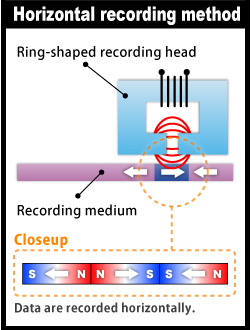
In data recovery its relevance is historical: these drives are unlikely to turn up in active cases. It does, however, set the reference point from which every later technology evolved.
2.2 PMR / CMR — Perpendicular Magnetic Recording (today's standard)
Around 2005, the industry moved to perpendicular recording [8], [1]: bits began to be stored vertically, perpendicular to the surface of the platter. This allowed a dramatic increase in data density in the same physical space. To achieve it, the platter gained a soft magnetic underlayer beneath the recording layer, which carries the head's magnetic flux and allows more stable materials to be used [7].
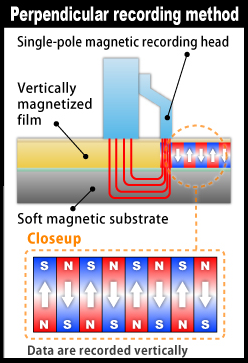
A common confusion is worth clearing up: PMR and CMR are not separate technologies. PMR describes the orientation of the bit (perpendicular), while CMR (Conventional Magnetic Recording) describes the layout of the tracks (parallel and conventional). Every CMR drive made since perpendicular recording was adopted is PMR; the term CMR became popular when manufacturers began publicly identifying their SMR models, around 2020 [9]. They are the same product seen from two different angles.
PMR vs CMR: the correct distinction
- PMR describes HOW the bit is oriented: perpendicular to the surface of the platter.
- CMR describes HOW the tracks are laid out: parallel, with a gap between them.
- Every CMR drive is PMR. They are not different levels of the technology hierarchy.
- The term CMR is used to set it apart from SMR, which is also PMR but with overlapping tracks.
The internal environment can be air (standard consumer and enterprise drives) or helium (high-capacity models, for example in the WD Gold and Ultrastar lines). Helium has about one seventh of the density of air: it reduces turbulence and platter vibration, which allows thinner platters and more of them in the same chassis (up to 10, against about 6 in air-filled drives), without changing the recording method [10].
2.3 SMR — Shingled Magnetic Recording (overlapping tracks)
SMR keeps PMR's perpendicular recording but radically changes the track layout: instead of leaving a gap between tracks, it partly overlaps them like roof tiles. This increases density and capacity per drive [11]; in recent commercial products the gain is moderate, for example 20 TB in SMR against 18 TB in CMR on the same Western Digital platform [2], or 32 TB against 30 TB at Seagate [12]. In exchange, it introduces the fundamental restriction that makes the head swap critical.
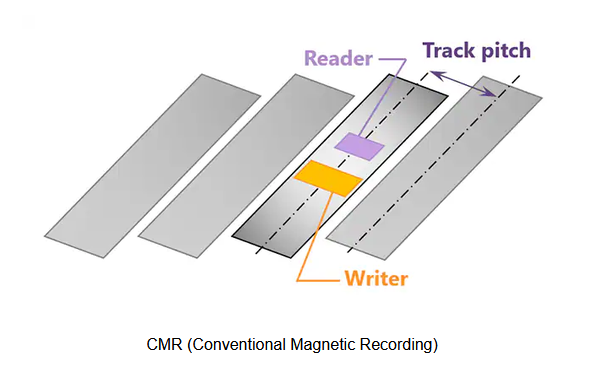
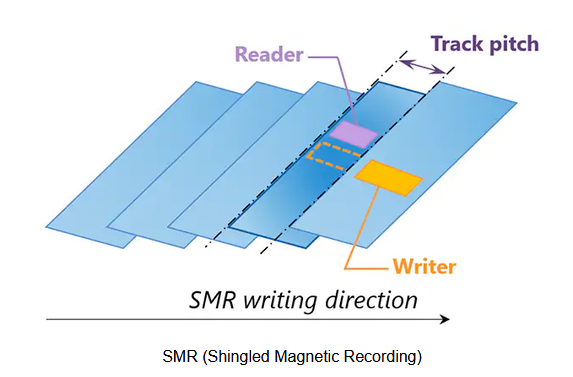
An individual SMR track cannot be rewritten without affecting the neighbouring overlapping tracks. To solve this write problem, manufacturers added a non-overlapping write zone that acts as a buffer [14]: Seagate calls it the media cache, and Western Digital's patents describe on-platter cache regions managed through a dynamic translation layer [14], [15]. How it works is explained in section 4 of this paper.
There are three types of SMR: drive-managed (the drive handles everything internally and works in any computer), host-managed and host-aware (the latter two require specific data-centre hardware and software) [11]. The drives that reach a recovery laboratory are almost always drive-managed.
The environment may be air or helium. Consumer SMR drives (2.5" laptop drives, desktop drives and entry-level NAS drives) are mostly air-filled; helium is concentrated in high-capacity enterprise models.
2.4 EAMR — Energy Assisted Magnetic Recording (the new generation)
As data density increases, the platter material has to be more magnetically resistant so that bits do not lose their state spontaneously. But the more resistant the material, the harder it is to write to with a conventional head. This problem, known as the magnetic recording trilemma [16], gave rise to energy-assisted recording. The three conflicting requirements:
- Thermal stability: recorded bits must be stable; they cannot change spontaneously because of ambient heat. To achieve this, the platter material has to be magnetically resistant (high coercivity).
- Writability: the head must be able to record bits on that material. But the more resistant the material, the harder it is to write to. Conventional heads no longer have enough magnetic field to overcome that resistance.
- Density and readability: bits must be small enough to achieve high storage density, yet distinct enough from one another to be read accurately.
EAMR is the umbrella term for every technology that uses external energy to temporarily overcome the platter's magnetic resistance during writing. There are three approaches with commercial products: HAMR (heat), MAMR (microwaves) and ePMR (energy-assisted Perpendicular Magnetic Recording), a Western Digital variant that applies an electric current to the write pole [2].
2.4.1 HAMR — Heat-Assisted Magnetic Recording (Seagate)
HAMR builds into the head a laser and a near-field transducer (NFT) that concentrates the light onto a spot only nanometres across [17]. During writing, that spot of the platter is heated above 400 °C for about a nanosecond [18], which temporarily lowers its coercivity and allows it to be written. As it cools, the bits are fixed stably in a material of high magnetic resistance.
Critical implication for data recovery: HAMR
The heat is concentrated at the interface between the head and the platter. Published research points to the head itself —in particular the NFT— and the platter surface (lubricant and protective carbon overcoat) as wear points [19]. There is no public evidence that the magnetic layer loses recorded data through heat build-up, but the condition of that interface is a new diagnostic variable that does not exist in CMR or conventional SMR. In addition, the laser built into the head is a component of extreme precision that makes the head swap even more complex than in conventional SMR drives.
Current HAMR drives are helium-filled, largely because of the number of platters they hold (up to 10) [4]. Seagate unveiled the Mozaic 3+ platform in January 2024 [4] and brought it to general availability at the end of 2024, in CMR (30 TB) and SMR (32 TB) versions [12].
2.4.2 MAMR — Microwave-Assisted Magnetic Recording (Toshiba)
MAMR builds into the head a spin-torque oscillator (STO) that generates a high-frequency magnetic field in the microwave range. That field makes it easier to reverse the magnetisation of the platter grains during writing, without heating it [20]. Toshiba has sold it since 2021 in its FC-MAMR (Flux-Controlled MAMR) variant, in the 18 TB MG09 series [3]. Western Digital, for its part, chose ePMR —a bias current applied to the write pole— in the Ultrastar DC HC550 (CMR) and HC650 (SMR) series [2], and announced the move to HAMR, with volume shipments expected in 2027 [5].
Key difference between HAMR and MAMR in data recovery
- HAMR: localised heat at the head-platter interface; wear of the NFT and of the surface are new variables. Head with a laser: greater mechanical and optical complexity.
- MAMR: no significant heat. Gentler on the platter material. High head complexity (spin oscillator), but without the thermal factor.
- Both share a helium environment, adaptive parameters of extreme specificity and, foreseeably, head swap complexity even greater than SMR; public laboratory experience with these drives is still scarce.
Toshiba's MG09 series is also helium-filled [3]. A frequent error is worth correcting: Western Digital's Ultrastar DC HC600 line consists of SMR drives, and its recent models use ePMR, not MAMR [2].
2.5 Comparison table: all the technologies
The following table summarises the critical characteristics of each technology from a data recovery perspective:
| Characteristic | LMR | CMR / PMR | SMR | EAMR (HAMR/MAMR) |
|---|---|---|---|---|
| Bit orientation | Horizontal | Perpendicular | Perpendicular | Perpendicular |
| Track layout | Parallel | Parallel | Overlapping (shingled) | CMR or SMR depending on model [12] |
| Internal environment | Air | Air / helium | Air / helium | Helium |
| Energy assistance | No | No | No | Laser (HAMR) / microwaves (MAMR) / current (ePMR) |
| Media cache | Not applicable | Yes, in many Seagate models | Critical | Yes, in SMR versions |
| Head swap tolerance | High | Medium | Low | Very low (little public experience) |
| Thermal wear of the interface | Not applicable | Not applicable | Not applicable | Head (NFT) and surface; under study (HAMR) [19] |
| Recovery complexity | Medium | High | Very high | Extreme / emerging |
| Market status | Obsolete (replaced in 2005–2006) | Current | Current | Expanding (MAMR 2021+, HAMR 2024+) |
3. Firmware: the drive's unique, irreplaceable memory
Today's hard drives need an internal micro operating system called firmware in order to work. Understanding its nature is essential to understanding why a head swap on an SMR drive is a high-risk procedure.
3.1 Definition and modular structure
Firmware is a set of software instructions with a modular structure made up of dozens —and in some families hundreds— of modules; in Seagate F3 they are grouped into "system files", each made up of several modules. Its main job is to manage, control and record the exact location of data on the magnetic surface of the drive. Not all modules are equally critical:
- Critical adaptive modules: they hold unique, irreplaceable information generated at the factory and during the drive's use. Without them, the drive cannot reach the sectors where the user's files are stored.
- Secondary modules: if some of these fail, the drive can keep reading and writing without major problems. Even so, on drives with a media cache, certain maintenance operations on them can erase the cache and, with it, user data [21].
| Component | Description | Critical function | Criticality |
|---|---|---|---|
| Critical adaptive modules | Mechanical calibrations and mapping | Without them the drive cannot access data | Extreme |
| Secondary modules | Medium relevance, such as SMART tables (the drive's self-diagnostic system), power-on hours, etc. | The drive can keep running if they fail | Low |
| PCB memory (printed circuit board) | The board's ROM chip (non-volatile memory, usually a flash chip); it holds the boot code and part of the drive's adaptives | Its contents are not replaced: the original ROM must be moved to the new PCB | High (extreme on encrypted drives) |
| Service Area (SA) | Located in a hidden, separate zone on the magnetic platters | Unique and irreplaceable for each drive, because of the adaptive modules | Extreme |
3.2 Where the firmware physically lives
This microprogram physically lives in two places: an electronic memory on the printed circuit board (PCB) and a hidden zone on the magnetic platters called the Service Area (SA).
Part of the head adaptives is stored in the PCB's ROM, as the laboratory case in section 5.3.4 shows, where each head's heater table is held in the board's memory. That is why the ROM is also unique to each drive.
3.3 The brain analogy: why it is not interchangeable
To grasp the irreplaceable nature of the adaptive firmware modules, it helps to use a medical analogy that shows the contrast between what can be replaced and what cannot.
If an electronic component on the board (PCB) is damaged, it can be replaced with an identical one so the drive powers up again. This is like an organ transplant in a human being: the body recovers its function once the affected part is replaced. With one important condition: the ROM chip, which holds part of the drive's "memory", has to move from the original board to the new one. And on drives with hardware encryption (SED, Self-Encrypting Drive), a board swap requires extra precautions, because the board takes part in managing the encryption [21].
Critical firmware, however, does not work like an interchangeable part, but like the memory of the brain. If a person suffers damage to the hippocampus, they lose their memories. The solution is not to implant someone else's brain, because memories are unique and cannot be transferred; the solution requires stimulating or repairing that specific area.
In the same way, the adaptive firmware modules hold the calibration "memory" that belongs exclusively to your hard drive. The firmware of another device cannot be fitted to it, because it would not know how to read the data recorded on the surface of its platters.
3.4 Conclusion on firmware
Without firmware in good condition, a hard drive cannot reach the sectors where your files are stored. Although this scenario is a serious technical challenge, identifying the fault in this structure is the essential first step towards designing a successful data recovery strategy.
This matters especially in SMR drives, where the adaptive modules hold, in addition to the head's mechanical calibrations, the translation tables of the media cache (or, at Western Digital, of the second-level translator, T2; the translator is the firmware table that translates each logical address into its physical location on the platter), which is the system that determines where each block of user data physically sits.
4. The media cache: the critical heart of SMR
4.1 Definition and purpose
To solve the slow-write problem inherent in the SMR architecture, which requires a whole band to be read before it can be written permanently, manufacturers reserve a non-overlapping write zone on the outer tracks of the platter (outer diameter), where linear speed is higher [22]. This zone is called the media cache: a persistent cache written directly on the magnetic platters, completely different from the volatile DRAM on the PCB. The technical literature calls it a persistent cache [22]. Western Digital also uses on-platter cache regions, described in its patents [23], [14].
Its job is to act as a fast write area that takes in the user's data immediately, so the drive can respond at acceptable speeds before reorganising the data into the final SMR zones.
It is worth noting that the media cache is not exclusive to SMR: in laboratory practice it is also found in many Seagate CMR drives, for example in the Grenada and Pharaoh families [21]. In SMR, however, its role is critical, because it holds the user's most recent writes [22], including updates to file system metadata.
Physical layout of an SMR drive
- CMR zone, media cache: tens of GB depending on the model (20–25 GiB measured on 5 and 8 TB Seagate drives [22]). Fast, random writes.
- SMR zone, final data: the rest of the drive, organised in 15–40 MiB bands [22]. High density, sequential writes.
- The initial CMR zone is not visible to the operating system; it is managed exclusively by the drive's internal firmware. Its mapping tables live in the Service Area (SA).
4.2 The life cycle of data on an SMR drive
When the user writes a file, the data does not go straight to its final location in the SMR zone. It follows a three-stage cycle:
- Initial write to the media cache: the data is written quickly to the CMR buffer zone. The drive confirms the write to the operating system immediately.
- Active waiting period: the data stays in the media cache while the drive is busy. A version in the cache and an older one in the SMR zone may coexist.
- Folding (consolidation): after a short idle period (about a second in published measurements), or forcibly when the cache fills up [22], the drive internally reorganises the data, moving it from the media cache to the final SMR bands with sequential writes.
A note on terminology: the technical literature calls this process cleaning [22]; in this paper we use the term folding (consolidation).
4.3 Folding (consolidation): a technical explanation
Folding is the most critical and vulnerable mechanism of the whole SMR architecture. It happens invisibly to the user, mainly when the drive is lightly used, and its job is to move the data held temporarily in the media cache to its final location in the SMR bands.
4.3.1 Structure of an SMR band
To understand folding, you need to understand how the SMR zone is organised. Data is not written track by track individually: it is organised in bands —15 to 40 MiB on the Seagate drives studied [22]—, each made up of several overlapping tracks. To change any data inside a band, the firmware has to rewrite the whole band sequentially. A single track cannot be changed without affecting the others. So, before changing a band, it first reads the existing contents, merges the old data with the new and writes the whole group of data back to the band.
SMR BAND #1
├── Track 1 ─────────────────────────────
├── Track 2 ──────────────────  (overlapping track 1)
├── Track 3 ──────────────────  (overlapping track 2)
└── Track N ──────────────────  (overlapping track N-1)
[ GUARD ZONE — separates bands to prevent interference ]
SMR BAND #2
├── Track N+1 …
4.3.2 The process step by step
- Detecting the right moment: the firmware starts folding when either of two conditions is met: the drive has gone a short while without receiving commands, or the media cache is full. In the second case, the drive may stop serving the system for a while as it reorganises the data [22]. It all happens automatically and invisibly to the operating system.
- Selecting the target band: the firmware consults its internal mapping tables to work out which media cache blocks belong to which target SMR band, and what the current state of that band is.
- Reading the whole existing SMR band: the firmware reads the entire target band —including the data that will not change— into a temporary internal buffer. This step is necessary because, to rewrite the band, it has to combine the old data with the new. If it does not read it first, the old data is lost.
- Merging the data: the firmware combines in memory the band's old data with the new data from the media cache. The translation tables are critical at this point: they determine exactly which logical position in the media cache corresponds to which physical position in the band.
- Sequentially rewriting the whole band: the firmware rewrites the entire band from start to finish, strictly sequentially, track by track. This is the longest and most vulnerable phase: if power is cut while a band is being rewritten, its data can be left inconsistent. Published measurements show between 0.6 and 1.6 seconds per modified band [22].
- Updating the translation tables: once the band has been rewritten, the firmware updates the mapping tables in the Service Area, marks the media cache blocks as released and records the new physical address of each block in the SMR zone.
- Releasing the media cache: the media cache sectors that held that data are marked as available for new writes. The cycle is complete.
4.3.3 Failure scenarios during folding
If the drive fails at any point between step 3 and step 6, it is left in a hybrid, inconsistent state:
| Block | State | Result | Risk of data loss |
|---|---|---|---|
| A | Written to the SMR zone | Completed | Low |
| B | Being written to SMR | Corrupted (interrupted write) | Extreme |
| C | Still in the media cache, not moved | Awaiting folding: data not yet consolidated | High if the cache tables are damaged |
The quietest scenario: tables out of sync
If the failure leaves the Service Area's translation tables out of sync with what is actually written on the platters, the problem no longer depends only on the affected band, but on how the firmware reacts at start-up. Some firmware chooses to reinitialise the cache, which erases the user's data updates that had not yet been consolidated. The result is a drive that seems to work, but whose data is left "full of holes": zeros or old versions instead of the recent information. The drive reports no error, and the destruction is carried out by its own firmware [21].
4.3.4 If it is not clear: an analogy
Folding can feel abstract in technical terms. Imagine you work in an office with two storage spaces: a desk (the media cache), small and fast, for immediate documents, and a filing cabinet (the SMR zone), large and organised in special drawers.
The filing cabinet has a peculiarity: to put a new document in any drawer, you first have to take everything out, add the new document in the right order and put everything back together. You cannot simply slip a new sheet in between the others.
During the day you leave documents on the desk because it is faster than opening the cabinet every time. At lunchtime —a quiet moment— the secretary takes the chance to file everything. That whole process is folding:
- Pick up the documents piled on the desk.
- Work out which drawer of the cabinet each one belongs to.
- Take out everything currently in that drawer.
- Combine the old documents with the new ones in the right order.
- Put everything back into the drawer in order.
- Update the general index with the new location of each document.
- Clear the desk: space available for new documents.
4.3.5 What happens if the secretary is interrupted halfway through
Interrupted at step 3: the drawer is empty
- The old documents are in her hands, but out of the drawer.
- The new documents are still on the desk.
- Nothing is where it should be.
- Equivalent to: old and new data with no final location.
Interrupted at step 5: the drawer is half done
- Half the drawer has new documents and the other half old ones.
- No version is complete or in order.
- Equivalent to: an SMR band with mixed, inconsistent data.
Interrupted at step 6: the drawer is perfect, but the index is not
- The drawer was refilled correctly, with every document in order.
- But the general index was not updated: nobody knows the documents are now in that drawer.
- When she resumes work, the secretary notices that the index does not match the drawers and, following her protocol, decides to "start from scratch": she clears the desk and throws away the pending notes.
- Equivalent to: inconsistent media cache tables that lead the firmware to reinitialise the cache, erasing updates that had not yet been consolidated.
Finally, fitting a poorly matched donor head in this scenario is like hiring a replacement who cannot read the handwriting in the general index. If they cannot read it, they may fill the illegible pages with default data or try to "tidy" the cabinet on their own, damaging documents that were perfectly stored. In practice something equivalent happens: when the firmware cannot read certain items in the Service Area at start-up, it may try to recover by writing to it [21]. That is why, before any handling, writing to the drive is blocked.
5. Why the head swap is critical on SMR drives
5.1 The chain of dependencies
On an SMR drive, the head, the firmware and the media cache form an inseparable chain of dependencies. A head swap is not simply a mechanical replacement: it is an intervention that affects all three at once.
5.2 Adaptive parameters per head
Every head is calibrated individually at the factory. Its adaptive parameters —among them the microjog, the lateral offset the head has to apply to read a track it has just written, because its read and write elements are physically separate and that offset varies with the position on the platter [24]; as well as the fly height, the read bias and the gain— are stored in the PCB's ROM, in the Service Area or in both, depending on the drive family, and are tied specifically to that physical head.
On an SMR drive, track density is significantly higher and the tracks overlap. A donor head of the same model may have:
- A different alignment offset (microjog) that makes the head read off-centre. The bigger the difference between the patient's and the donor's offsets, the bigger the read problems.
- Different read parameters (gain, sensor bias) that lower the signal-to-noise ratio and increase read errors.
- A different thermal profile that changes the real distance between the head and the platter in operation; this point is developed in detail in the next section.
That is why the donor is selected by comparing model, firmware version, site code (the manufacturing plant code), a close manufacturing date, preamp version (the preamplifier chip mounted on the head stack, which amplifies the read signal and controls writing) and head map (the map showing which physical heads the drive uses and in what order).
5.3 The head's thermal profile: the quietest factor
The thermal profile is one of the least known adaptive parameters outside specialist circles, but it is decisive in a head swap. The industry knows it as TFC (Thermal Fly-height Control) [25]; Seagate calls it AFH (Adaptive Fly Height).
5.3.1 Heads fly, they do not touch
Heads do not rub the surface of the platter: they float on a cushion of air (or helium) at a distance called the fly height. In modern drives, the working gap between the read/write elements and the platter is only a few nanometres [26]. That distance is not fixed: the firmware adjusts it actively through a heater built into the head, and it also varies with the drive's temperature.
Thermal Fly-height Control (TFC): how it works
- Modern heads have a micro-heater (TFC heater) next to the read and write elements. When the firmware powers it, that area of the head expands and protrudes a few nanometres towards the platter (protrusion), bringing the elements closer to the magnetic medium [25].
- More heater power → more protrusion → lower fly height → stronger signal and better resolution.
- Less heater power → less protrusion → higher fly height → lower risk of contact.
At the factory, each head is calibrated by bringing it towards the platter until contact is detected (touchdown) and then backing off to a safe distance [26]. The result is not a single value but a table of parameters: per head and per zone of the drive, separate for reading and writing [25]. Depending on the family, these parameters are stored in the PCB's ROM —as in the case in section 5.3.4— or in the Service Area.
5.3.2 Why two heads of the same model are not thermally identical
Even if they come from the same manufacturing batch, every head has minimal but significant physical variations:
- Heater efficiency: how many nanometres the head protrudes per unit of power applied; it depends on the heater's material, geometry and electrical resistance.
- Microscopic geometry: the dimensions of the read and write elements vary at nanometre level from head to head.
- Passive fly height: the flying height without heating, which depends on the aerodynamic design of the slider —the part of the head that flies over the platter, whose underside is called the air bearing surface— and on its manufacturing tolerances.
The result is that, with the same power applied, two heads of the same model can end up at different distances from the platter. After a head swap, the firmware keeps using the table calibrated for the original head, not for the donor; that is why analysing the donor drive is a mandatory step before going ahead.
5.3.3 Consequences on an SMR drive
An incorrect fly height affects any drive, CMR or SMR. The difference is the margin: on SMR the head reads a narrower strip of track —the visible part of each overlapping track—, so the available signal is smaller and any loss of amplitude turns into read errors sooner.
Fly height higher than expected (head further from the platter)
- Reduced signal amplitude: more read errors, slow reads and retries.
- Lower resolution: greater sensitivity to the signal from neighbouring tracks.
- When writing: a weaker magnetic field, so data is not written properly on the track.
Fly height lower than expected (head closer to the platter)
- Risk of contact with the platter: any irregularity (a particle, raised lubricant, a mark from a stuck head) can scratch the surface.
- Accelerated head wear and contamination of the slider with lubricant.
- When writing: a stronger field, which may affect adjacent tracks.
- A scratch is irreversible mechanical damage to the user area or the Service Area.
Note: picking up the signal of the neighbouring track is not caused by the fly height, which is a vertical distance, but by the head's lateral offset (offset or microjog), covered in section 5.2.
The thermal profile is therefore a quiet factor: a mismatch rarely causes an immediate, obvious failure. It shows up as read errors concentrated in certain zones or heads, slow reads or inconsistent data. These symptoms can be mistaken for bad sectors or data corruption.
These parameters can be diagnosed and adjusted with a manufacturer command tool (VSC and terminal), which allows read heating to be raised or lowered per zone and the result to be checked on specific sectors. VSCs (Vendor Specific Commands) are commands the ATA standard reserves for each manufacturer's use and that are not published; together with the drive's serial terminal, they give access to internal functions such as the Service Area or the head parameters. It is a controlled-risk procedure that requires a prior ROM backup, active write blocking, gradual changes and ruling out any mechanical damage to heads or platters first. At the slightest suspicion of physical damage, the thermal profile is not adjusted: the head stack is replaced or cleaned.
5.3.4 A real example: the thermal profile of a laboratory drive
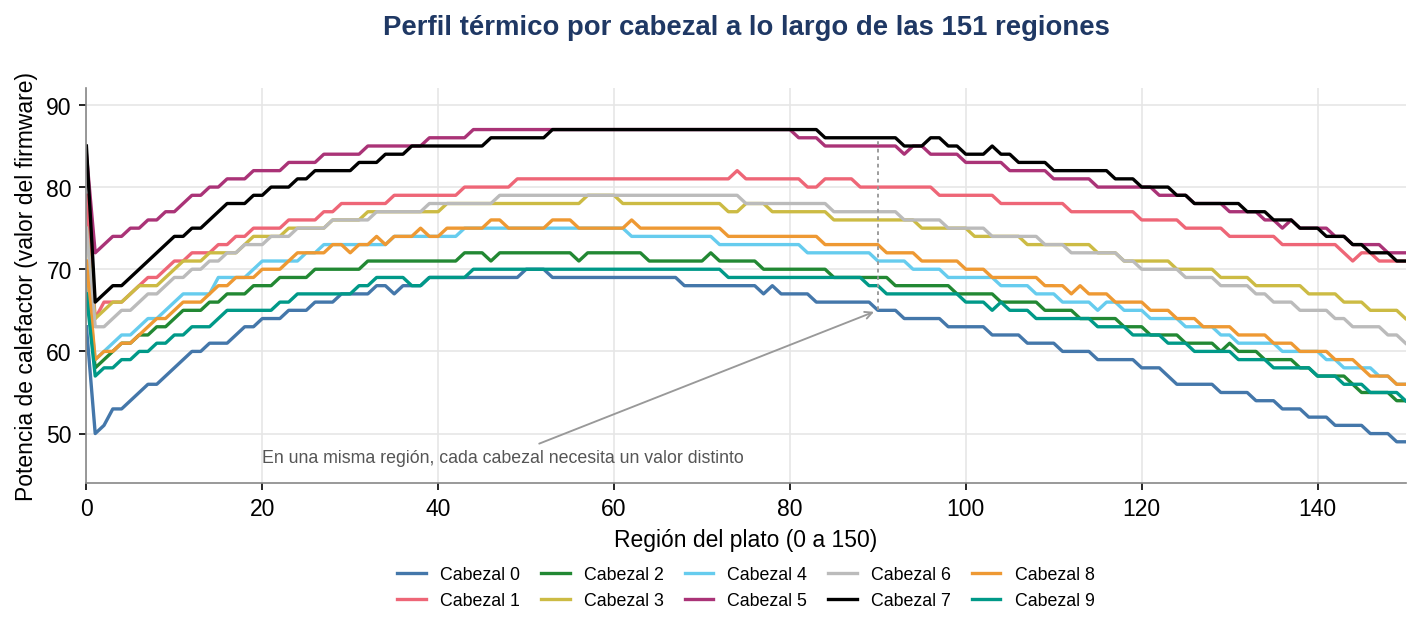
The following figures show real firmware data from a 2.5-inch, 5 TB Seagate drive of the F3 family, with 10 heads, handled in our laboratory. For each head, the firmware stores one heater value for each of the platter's 151 concentric regions; the figures show those values as the drive stores them.

How the compatibility of a donor head is assessed
Since every head has its own thermal fingerprint, a donor head will only be compatible if its behaviour resembles the original's. In the laboratory, compatibility is assessed in four steps:
- Matching basic data: model with suffix, firmware version, site code, close manufacturing date, preamp version and head map.
- Comparing the thermal fingerprint: the donor drive's firmware parameters are read and compared, head by head and region by region, with the patient's, as in figures 6 and 7. The smaller the difference, the less adjustment will be needed. It is the laboratory's own criterion, based on the same logic used to compare other head adaptives, such as the position offset (microjog).
- Familiarity test: the patient's PCB is fitted to the donor drive, with a prior backup and write blocking. If the donor starts without knocking, its heads tolerate the patient's parameters. This is a necessary but not sufficient condition: a donor that starts well may still read certain regions badly. On drives with hardware encryption (SED), swapping boards requires extra caution.
- Verification after the swap: each head's regions are tested with the manufacturer command tool; slow regions or regions with errors show where the donor's profile departs from the original and where a controlled adjustment may be needed.
5.4 The effect of miscalibration on the firmware and the bands
There is an effect of a poorly matched head that is often underestimated: a miscalibrated donor head does not only read fewer sectors; on an SMR drive it can lead the firmware itself to make wrong decisions about the Service Area and the media cache, because its internal processes keep running in the background [22] with whatever information it manages to read.
5.4.1 What happens physically
A donor head with a microjog offset different from the original does not read the centre of the track but an offset position. On SMR, where the readable strip of each track is narrow, that offset reduces the useful signal and adds interference from the neighbouring track:
Track interference caused by alignment offset
Signal from the target track (weaker because of the offset) + residual signal from the neighbouring track (interference) → the signal-to-noise ratio drops → the error-correcting code (ECC) cannot correct it → read error and retries.
The drive does detect the problem: every sector has its own error-correcting code and the servo marks tell it which track it is on. That is why the usual symptoms are read errors, retries and slowness. The bigger risk is not in that faulty read, but in what the firmware does next.
5.4.2 The firmware's two dangerous responses
Response 1, writing default data to the Service Area: if at start-up the firmware cannot read certain items in the Service Area, it may try to recover by writing default values or partly read data to it [21]. With heads in poor condition, the firmware's internal processes can damage critical objects in the Service Area. Direct consequences:
- The translator, the media cache tables or the defect lists (firmware records of the damaged sectors the drive hides and remaps) are damaged.
- The drive freezes at start-up or returns zeros and old versions of the data.
- Repairing the Service Area takes more time, more donors and more risk.
Response 2, reinitialising the media cache: certain conditions or commands —inconsistent media cache tables, recalculating the translator or other firmware maintenance operations— can lead the firmware to clear or reinitialise the media cache. At Western Digital, the equivalent risk is the loss or regeneration of the second-level translator [21]. Direct consequences:
- Updates not yet consolidated into the bands are erased.
- The most recent writes are lost [22], including updates to file system metadata.
- The drive may return zeros or old data across wide areas [21].
- Internal band reorganisation processes start up even when the drive is idle [22].
5.4.3 The most critical point
The damage is done by the firmware itself, in the background, while the technician believes they are only reading. That is why write blocking —in software and in hardware— is the first line of defence.
Poorly matched donor head
   ↓
Degraded reads in the Service Area or in the bands
   ↓
The firmware cannot read critical tables (translator, media cache tables)
   ↓
It writes default values, reinitialises the media cache or carries on reorganising bands
   ↓
Loss of metadata and of recent versions of the data
   ↓
Logical corruption, with no obvious warning for the technician
5.5 Translation tables and the firmware
The media cache introduces a layer of logical abstraction that in conventional CMR drives is much simpler or does not exist. The firmware keeps translation tables that map each logical block (LBA) to its real physical location, which may be in the media cache or in the SMR zone [15]. These tables live in the Service Area, and reading them requires at least one head in the system to work properly.
Donor head installed → poor reading of the Service Area
   ↓
Modules or tables unreadable or partly read → the firmware tries to recover
   ↓
Default writes or media cache reinitialisation → the LBA ↔ physical location mapping is lost
   ↓
Data comes back as zeros, old versions or fragments
   ↓
Serious data loss, often irreversible without a prior backup
Even so, it is not always final: with prior backups of the translation tables and specialist tools, it is possible to rebuild them or to read the blocks in their physical order (PBA) and recover files [21].
6. Recommendations for cases involving SMR drives
6.1 Before any intervention
- Prior identification: confirm whether the drive is SMR before going ahead, by checking the manufacturer's specifications or using specialist diagnostic tools.
- Safety image: where possible, create a sector-by-sector image of the readable areas before any mechanical intervention, using the mapping technique.
- Specialist tools: do not attempt a head swap without tools that can read and adapt the firmware's adaptive parameters.
- Write blocking: enable blocking in software and, if possible, in hardware before any handling, to stop the firmware writing to the Service Area or the user area.
- Backup of unique resources: save the ROM, translator, media cache tables, defect lists and encryption configuration (SED) —in all their copies— before any repair.
- Commands to avoid on SMR: do not recalculate the translator or run firmware maintenance operations on drives with a media cache, unless there is a backup and the effect is fully understood [21].
- Donor selection: compare model, firmware, site code, manufacturing date, preamp version and position offsets (microjogs) before the swap.
- Encryption configuration: identify whether the drive boots in normal or encrypted mode (SED, or FIPS: encryption certified under the US Federal Information Processing Standards) and apply the corresponding technique.
6.2 During the evaluation
- Document the state of the media cache and of the SMR zone separately during the diagnosis.
- Check whether there is an interrupted folding by analysing the firmware's translation tables.
- Assess whether the critical data is in the media cache (CMR zone) or in the final SMR zone.
6.3 Communication with the client
It is essential to tell the client clearly and in writing that SMR drives represent a higher level of complexity in data recovery. The success of the process depends on technical factors that go beyond visible physical damage, including the state of the firmware, the integrity of the Service Area and the condition of the media cache. At the same time, it is worth conveying that, with the right protocol and tools, many of these cases are still recoverable.
7. Conclusion
SMR technology introduces a storage architecture that, although efficient in terms of density, is extraordinarily sensitive to mechanical intervention. A head swap on these drives, without the right knowledge, tools and adaptive parameters, can turn a difficult recovery into a total loss.
The firmware, with its unique adaptive modules stored in the Service Area and in the ROM, acts as the drive's exclusive memory. Just as the memory of the human hippocampus cannot be transplanted, a head's adaptive parameters cannot simply be replaced with those of another device, even of the same model.
The media cache and folding are the points of greatest vulnerability: data may be in intermediate states spread across the CMR buffer zone and the final SMR zone, and only working firmware with a correctly calibrated head can determine the real state of each block.
The good news is that the risk can be managed. With write blocking, a prior backup of the drive's unique resources, rigorous donor selection and specialist tools, many of these cases are still recoverable.
Key points
- Technology tree: LMR → PMR, which is organised as CMR or SMR; EAMR (ePMR, MAMR, HAMR) is the evolution of PMR and exists in CMR and SMR versions.
- PMR and CMR are not separate technologies: PMR is the orientation of the bit; CMR, the track layout.
- SMR uses perpendicular recording (PMR) but with overlapping tracks, which is incompatible with direct rewriting.
- HAMR and MAMR are EAMR technologies: they need external energy (laser or microwaves) to write.
- In HAMR the heat is concentrated at the head-platter interface: wear of the NFT and of the surface are new diagnostic variables.
- Firmware contains dozens or hundreds of modules depending on the family; the adaptives are unique and irreplaceable for each drive.
- Critical modules live in the Service Area (SA), a hidden zone on the platters, and part of the adaptives in the PCB's ROM.
- The media cache is an internal fast-write zone; it also exists in many Seagate CMR drives, but on SMR it is critical.
- An interrupted folding leaves data in a hybrid state between the media cache and the SMR zone, which is hard to rebuild.
- The head's thermal profile (TFC/AFH) is a table calibrated per head and zone; a donor may end up at the wrong fly height, but it is a parameter that can be diagnosed and adjusted carefully.
- In HAMR the head includes a laser of extreme precision: the head swap is even more complex than in SMR.
- Identifying the drive's technology and creating a safety image are non-negotiable first steps.
- On SMR the biggest risk comes from the firmware's own writes: write blocking and a prior backup of the Service Area are the first line of defence.
References
IEEE format. Sources are numbered in order of first citation in the text. Links accessed on 23 and 24 September 2026.
- Computer History Museum, "2005: Perpendicular Magnetic Recording arrives," The Storage Engine. Accessed: 23 Sep. 2026. https://www.computerhistory.org/storageengine/perpendicular-magnetic-recording-arrives/
- Western Digital, "Energy-Assisted Magnetic Recording Technology for Higher HDD Capacities," technical brief, Oct. 2020. Accessed: 23 Sep. 2026. https://documents.westerndigital.com/content/dam/doc-library/en_us/assets/public/western-digital/collateral/tech-brief/technology-brief-energy-assisted-magnetic-recording.pdf
- Toshiba Electronic Devices & Storage Corporation, "High-Reliability FC-MAMR Nearline HDD with a Capacity of 18 TB," Feb. 2021. Accessed: 23 Sep. 2026. https://toshiba.semicon-storage.com/content/dam/toshiba-ss-v3/master/en/storage/product/data-center-enterprise/202102025_nearlineHDD_18TB_e.pdf
- C. Mellor, "Seagate unveils 30 TB+ Exos HAMR disk drives," Blocks & Files, 17 Jan. 2024. Accessed: 23 Sep. 2026. https://blocksandfiles.com/2024/01/17/seagate-hamr-drives/
- A. Shilov, "Western Digital still plans to start shipping 36TB HAMR hard drives in 2027," Tom's Hardware, 29 May 2025. Accessed: 23 Sep. 2026. https://www.tomshardware.com/pc-components/hdds/western-digital-still-plans-to-start-shipping-36tb-hamr-hard-drives-in-2027
- Computer History Museum, "1956: First commercial hard disk drive shipped," The Storage Engine. Accessed: 23 Sep. 2026. https://www.computerhistory.org/storageengine/first-commercial-hard-disk-drive-shipped/
- HGST, a Western Digital company, "Perpendicular Magnetic Recording Technology," white paper, Nov. 2007. Accessed: 23 Sep. 2026. https://documents.westerndigital.com/content/dam/doc-library/en_us/assets/public/western-digital/collateral/white-paper/white-paper-pmr.pdf
- Toshiba Corporation, press release on the first HDDs with perpendicular recording (MK4007GAL and MK8007GAH), 14 Dec. 2004. Accessed: 23 Sep. 2026. https://www.global.toshiba/ww/news/corporate/2004/12/pr1401.html
- C. Mellor, "Toshiba publishes list of consumer HDDs that use shingled magnetic recording," Blocks & Files, 29 Apr. 2020. Accessed: 23 Sep. 2026. https://blocksandfiles.com/2020/04/29/toshiba-consumer-disk-drives-smr-list/
- M. Luong, "Explained: Helium Hard Drives," Western Digital Blog, 29 Aug. 2023. Accessed: 23 Sep. 2026. https://blog.westerndigital.com/helium-hard-drives-explained/
- Western Digital Corporation, "Shingled Magnetic Recording Hard Disks," Zoned Storage. Accessed: 24 Sep. 2026. https://zonedstorage.io/docs/introduction/smr
- M. Connatser, "Seagate launches 32TB Exos M hard drive based on HAMR technology," Tom's Hardware, 17 Dec. 2024. Accessed: 23 Sep. 2026. https://www.tomshardware.com/pc-components/hdds/seagate-launches-32tb-exos-m-hard-drive-based-on-hamr-technology-mozaic-3-drives-are-the-worlds-first-generally-available-hamr-hdds
- Toshiba Electronic Devices & Storage Corporation, "What is SMR Technology?" Accessed: 23 Sep. 2026. https://toshiba.semicon-storage.com/ap-en/storage/product/articles/what-is-smr-technology.html
- J. D. Coker and D. R. Hall, "Storage device with shingled data and unshingled cache regions," U.S. Patent US 8 913 335 B2, 16 Dec. 2014 (Western Digital Technologies; formerly HGST). Accessed: 24 Sep. 2026. https://patents.google.com/patent/US8913335
- J. D. Coker and D. R. Hall, "Indirection memory architecture with reduced memory requirements for shingled magnetic recording devices," U.S. Patent US 8 578 122 B2, 5 Nov. 2013 (Western Digital Technologies; formerly HGST). Accessed: 24 Sep. 2026. https://patents.google.com/patent/US20120303930
- H. J. Richter, "The transition from longitudinal to perpendicular recording," Journal of Physics D: Applied Physics, vol. 40, no. 9, pp. R149–R177, 2007, doi: 10.1088/0022-3727/40/9/R01.
- M. H. Kryder et al., "Heat Assisted Magnetic Recording," Proceedings of the IEEE, vol. 96, no. 11, pp. 1810–1835, Nov. 2008, doi: 10.1109/JPROC.2008.2004315.
- M. Re, "HAMR Hard Drives: Increasing Data Density and Drive Capacity" (guest post by Seagate's CTO), Backblaze Blog, 14 Dec. 2017. Accessed: 23 Sep. 2026. https://www.backblaze.com/blog/hamr-hard-drives/
- Y. Zhang, H. Tang and A. A. Polycarpou, "High Temperature Mechanics, Friction, Wear and Adhesion of Heat-Assisted Magnetic Recording," Tribology Letters, 2020, doi: 10.1007/s11249-020-01348-z.
- J.-G. Zhu, X. Zhu and Y. Tang, "Microwave Assisted Magnetic Recording," IEEE Transactions on Magnetics, vol. 44, no. 1, pp. 125–131, Jan. 2008, doi: 10.1109/TMAG.2007.911031.
- Tecnología y Negocios del Caribe C.A. (Venezuela) and IT & Data Services S.A. de C.V. (Mexico), "Technical records of data recovery cases on Seagate and Western Digital drives," unpublished internal documents, 2011–2026.
- A. Aghayev and P. Desnoyers, "Skylight—A Window on Shingled Disk Operation," in Proc. 13th USENIX Conference on File and Storage Technologies (FAST '15), Santa Clara, CA, USA, Feb. 2015, pp. 135–149. Accessed: 23 Sep. 2026. https://www.usenix.org/conference/fast15/technical-sessions/presentation/aghayev
- J. Xu et al., "Media based cache for data storage device," U.S. Patent US 9 959 052 B1, 1 May 2018 (Western Digital Technologies). Accessed: 24 Sep. 2026. https://patents.google.com/patent/US9959052B1/en
- R. M. Ehrlich and F. A. Zayas, "Method for microjog calibration by read-write zone," U.S. Patent Application US 2006/0056093 A1, 16 Mar. 2006. Accessed: 24 Sep. 2026. https://patents.google.com/patent/US20060056093
- HGST, a Western Digital company, "Thermal Fly-height Control (TFC) Technology in HGST Hard Disk Drives," white paper, Nov. 2007. Accessed: 23 Sep. 2026. https://documents.westerndigital.com/content/dam/doc-library/en_us/assets/public/western-digital/collateral/white-paper/tfc-whitepaper041807.pdf
- J. Li et al., "Fly-height control and touchdown detection," U.S. Patent US 8 873 191 B2, 28 Oct. 2014 (Western Digital Technologies / HGST). Accessed: 23 Sep. 2026. https://patents.google.com/patent/US8873191B2/en
R&D Department, Advanced Data Recovery. IT & Data Services S.A. de C.V. (Mexico) and Tecnología y Negocios del Caribe C.A. (Venezuela). June 2026, revised September 2026.
Services related to this article


